~/projects / net-health-monitor
net-health-monitor/
A self-hosted dashboard that pings hosts, scans a few TCP ports, runs DNS lookups and asks an LLM to explain what it found. It began as a public demo. I pulled it off the internet and rebuilt it as a local tool, because anything that scans on request is easy to abuse.
- Python
- FastAPI
- Pydantic
- React
- Vite
- Docker Compose
- nginx
- pytest
- GitHub Actions
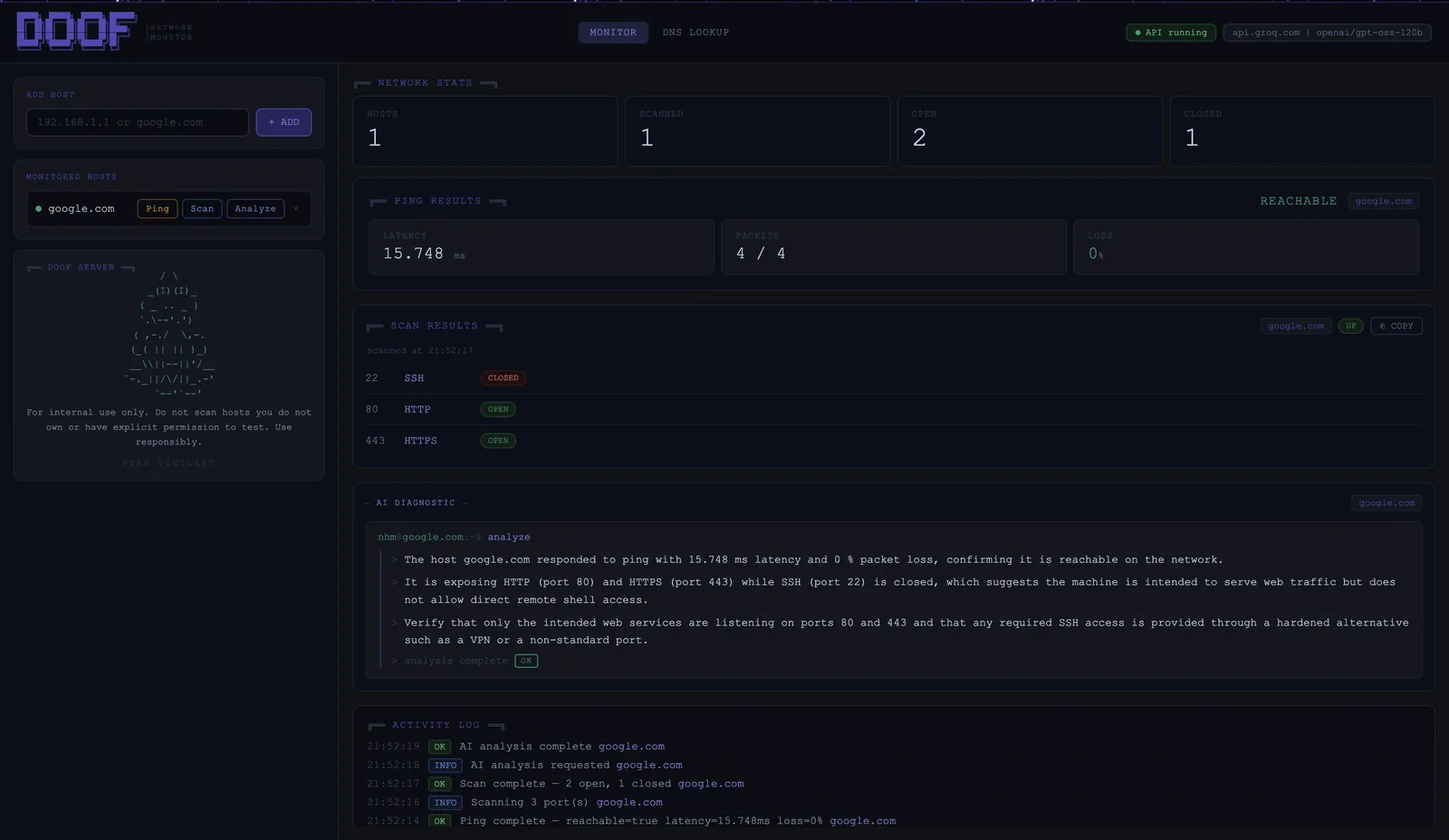
$ cat features
- Ping with latency and packet loss.
- TCP connect scan of up to 20 chosen ports per host.
- DNS lookups: A, AAAA, MX and NS for names, PTR for IPs.
- Diagnostic summaries from any OpenAI-compatible API. Groq is the default, and a local Ollama works too if nothing should leave the machine.
$ cat history
The first version ran on a public web server in my homelab, with a model on my own GPU writing the summaries. It worked as a demo, but it had three problems. A public form that scans any target is a free tool for whoever finds it. My ISP puts me behind CGNAT, so everything went through a tunnel. And one GPU meant one request at a time, so a second visitor just waited.
So I dropped public hosting and the GPU setup. The web server VM is gone, and the app now talks to any OpenAI-compatible API. It's open source, and the intended way to run it is on your own machine or network.
$ cat security-model
| Risk | What stops it |
|---|---|
| Scanning internal or cloud-metadata addresses | Targets are checked by resolved IP, not by name. Private, loopback, link-local, CGNAT and reserved ranges are blocked by default if any resolved address matches |
| DNS rebinding | The name is resolved again at scan time and the already-checked IP is the one that gets scanned |
| Scan data leaking to a third-party LLM | Every IP and hostname is swapped for a placeholder like IP_1 before the prompt is sent, then swapped back in the reply |
| Prompt stuffing through the API | DNS analysis takes only a target and re-runs the lookup on the server, so no client-supplied text reaches the prompt |
| Malformed or oversized input | Pydantic validates every request body, and bodies over 1 KB are rejected |
| Command injection through ping | Ping runs as an argument list with no shell |
| One client hogging it | Per-client rate limits: 10/min for scans, 5/min for AI analysis. Behind a proxy, only that proxy's forwarded address is trusted |
There is no login, and the README says so plainly: anyone who can reach it can scan with it. That's why it stays on localhost, a LAN or a VPN.
$ cat deploy/homelab
My own copy runs on doof, my Proxmox server:
- An unprivileged LXC container running Docker Compose: the API plus an nginx container for the frontend.
- Nginx Proxy Manager in front with a TLS certificate. The Proxmox firewall lets only the proxy reach the app's port.
- Reachable from my LAN and over VPN only. No tunnel route, nothing public.
- Private targets are allowed on this instance, since scanning my own servers is the point.
One gotcha: ping failed inside the container at first. Unprivileged ICMP sockets depend on ping_group_range, and its default range didn't fit the container's mapped IDs. Narrowing it to the container's range fixed it.
$ cat engineering
- 102 pytest tests covering target blocking, rebinding, redaction, rate limits and the LLM client.
- One GitHub Actions workflow with three parallel jobs: the API (ruff, pip-audit, pytest), the frontend (lint, npm audit, build) and a Docker build.
- Configured entirely through
.env, with safe defaults when a setting is missing. - Security reports go through GitHub private vulnerability reporting.
$ cat known-limits
- Hosts and results live in memory and are gone after a restart.
- Ping output is parsed for Linux and macOS only.
- No user accounts, so access control is whatever the network gives you.